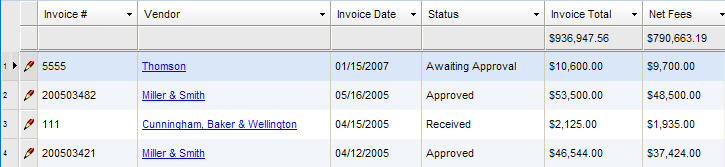
Below provides a description of the fields contained in the main (header) section of the Invoices notebook.
|
Field |
Description |
Required (Y/N) |
|
Invoice # |
The number assigned to the invoice. |
Y |
|
Vendor |
The vendor associated with the invoice. To find a match, begin typing the vendor name in this field or select a name from the dropdown menu. If the vendor name is not on the list, it must be added. To add a new vendor, click the |
Y |
|
Office |
The vendor location. Select the applicable vendor location from the dropdown menu. |
N |
|
Invoice Date |
The date that this invoice was created. Pressing the SPACEBAR automatically enters the current date. |
Y |
|
Start Date |
The start date for the invoice. Pressing the SPACEBAR automatically enters the current date. |
Y |
|
End Date |
The end date for the invoice. Pressing the SPACEBAR automatically enters the current date. |
Y |
|
Due Date |
The date the payment is due. Auto-populates for electronic invoices. For manual invoices, when you enter or change an invoice date, this field will auto-populate to 30 days after the invoice date, but it may be edited. |
Y
|
|
Status |
The current status of the invoice. Select an option from the dropdown menu. |
Y |
|
Type |
The invoice type (i.e., electronic or manual). |
Y (read-only) |
|
Currency |
The currency in which the payment was payment was made. Select an option from the dropdown menu. |
Y |
|
Pay. Terms |
The payment terms associated with the invoice. |
Y |
|
Billing Year |
The budget year (YYYY) associated with the invoice. |
Y |
|
Description |
A description of the invoice. To enter or view the contents of a note without scrolling, click the |
N |
|
Original Fees |
The original amount of fees on the invoice prior to discounts and adjustments. |
Y (read-only) |
|
Fee Discount |
The discount amount applied to fees. |
Y (read-only) |
|
Fee Adjustment |
The adjustment amount (lower or higher) applied to fees. |
Y (read-only) |
|
Net Fees |
The total fee amount due after discounts and adjustments have been applied to the original fees. |
Y (read-only) |
|
Original Disb. |
The original amount of disbursements on the invoice prior to discounts and adjustments. |
Y (read-only) |
|
Disb. Discount |
The discount amount applied to the disbursement. This field cannot be modified. |
Y (read-only) |
|
Disb. Adjustment |
The adjustment amount (lower or higher) applied to the disbursement. |
Y (read-only) |
|
Net Disb. |
The total disbursement amount after discounts and adjustments have been applied to the original amount. |
Y (read only) |
|
Invoice Total |
The invoice total after fees and disbursements are applied. |
Y (read-only) |
|
Allocation Error |
Indicates if the invoice is allocated correctly. |
N |
Note: All entity records include fields containing audit and security information. For a detailed explanation of these fields, see Viewing Audit Fields and Security Information.
 button to launch the Vendor notebook.
 button to display the