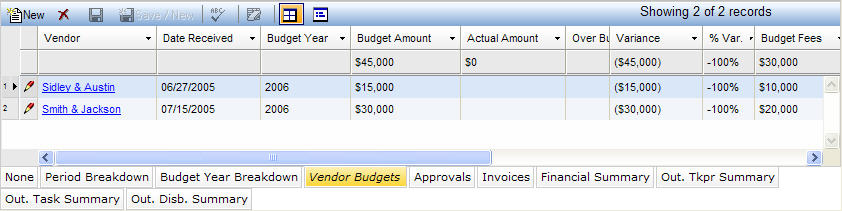
The Vendor Budgets tab allows you to record a vendor’s estimate or budgets for the matter. If the budget from the vendor is for one year, the year can be entered. If it is a matter budget, the year field can be left blank. The budget may be broken down into fees and disbursements. The actual total, fee, and disbursement values are available on this tab so you can track the quality of the budgets provided by the various vendors. The Vendors column allows you to launch into the Vendors notebook, from which you can gain more detail about the vendor’s expenses if you require detailed expenses beyond this level. Entering budget information on this tab does not affect the budget amounts anywhere else in this notebook.
Note: If all vendors that have invoiced on this matter are not listed here, the total actuals will not equal the total actual in the main section of the Matter Budget notebook.
The Vendor Budget tab, which is accessed by clicking on the tab in the binder section of the Matter Budgets notebook, displays in tabular view as described below.
|
Field |
Description |
Required (Y/N) |
|
Vendor |
The applicable vendor for the budget record displayed in the main section of the notebook. Select this value from a dropdown list. |
Y |
|
Date Received |
The date the vendor budget was received |
N |
|
Budget Year |
The budget year (if the vendor budget is for a particular year.) |
N |
|
Budget Amount |
The budget amount associated with this vendor. This field is set whenever the Fees or Disbursements fields are changed. This field is totaled at the bottom in tabular display mode. This field is read-only, but is searchable. |
Y (read-only) |
|
Actual Budget |
The sum of all invoices for this matter and for this vendor with an invoice status classified as Actual. This field is totaled at the bottom in tabular display mode. This field is calculated and not searchable. |
N (read-only) |
|
Over Budget |
The over budget indicator. If the Actual Amount field is greater than the Budget Amount field, this field displays an asterisk (*). This field is calculated and not searchable. |
N |
|
Variance |
The dollar value difference between the Actual Amount and Budget Amount fields (Variance = Actual – Budget). This field is totaled at the bottom in tabular display mode. This field is calculated and not searchable. |
N |
|
% Var.
|
The percentage difference between the Actual Amount and Budget Amount fields (% Var. = Variance / Budget). The total field at the bottom in tabular display mode should display the total variance/total budget. This field is calculated and not searchable. |
N |
|
Budget Fees |
The portion of this vendor’s budget set aside for fees. When this field is changed, the Budget Amount field is set to fees plus disbursements. This field has a total value. |
N |
|
Actual Fees |
The sum of all fees on invoices for this matter and for this vendor with an invoice status classified as Actual. This field is totaled at the bottom in tabular display mode. This field is calculated and not searchable. |
N (read-only) |
|
Budget Disb. |
The portion of this vendor’s budget set aside for disbursements. When this field is changed, the Budget Amount field is set to fees plus disbursements. This field has a total value. |
N |
|
Actual Disb. |
The sum of all disbursements on invoices for this matter and for this vendor with an invoice status classified as Actual. This field is totaled at the bottom in tabular display mode. This field is calculated and not searchable. |
N |
|
Note |
Allows you to enter a note. Click |
N |
Note: LawManager tab records include fields containing audit and security information. For a detailed explanation of these fields, see Viewing Audit Fields and Security Information.
 to enter data.