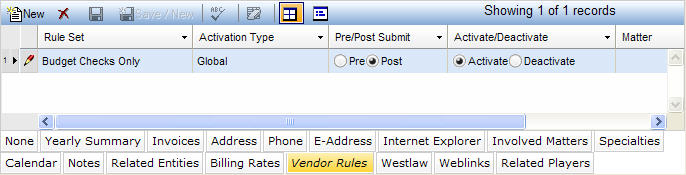
The Vendor Rules tab allows the administrator to configure the specific audit rules that should be run for the vendor.
Note: Audit rules can also be controlled from the Activate Rules notebook.
The Vendor Rules tab is accessed by clicking on the tab in the binder section of the Vendors notebook. It displays in tabular view as described below.
|
Field |
Description |
Required (Y/N) |
|
Rule Set |
The set of rules (Duplicate Check, Audit Checks, etc.) to apply to this vendor displayed in the main section of the notebook. Note: Rule Sets are created in the Activate Rules notebook. |
Y |
|
Pre/Post Submit |
Indicates whether to run the rule set prior to (pre) or after (post) it is submitted to the Invoices notebook. |
Y |
|
Activate/Deactivate |
Indicates whether this rule is active (Activate) or inactive (Deactivate). |
Y |
|
Matter |
The specific matter to associate with this vendor. This value is selected from a dropdown list. If this field is left blank, then the rule will be applied to all matters for which this vendor is used. |
Y |
Note: LawManager tab records include fields containing audit and security information. For a detailed explanation of these fields, see Viewing Audit Fields and Security Information.