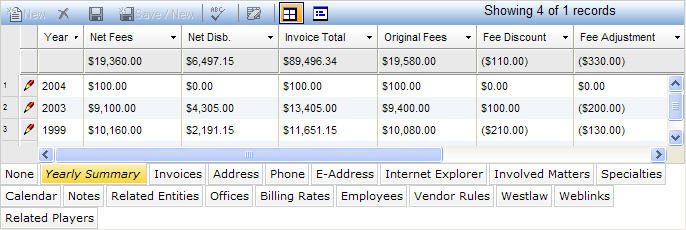
This tab gives you a yearly summary of all of the invoices from a vendor. It displays the sum of the financial fields from the main section of the Invoices notebook for each year that there are invoices.
Note: This tab sums all invoices, not just the actual invoices.
The fields are also totalled at the bottom for overall amounts for the vendor. This tab is read-only and the Year field is the only searchable field. The Yearly Summary tab is accessed by clicking on the tab in the binder section of the Vendors notebook. It displays in tabular view as described below.
|
Field |
Description |
Required (Y/N) |
|
Year |
The budget year of the vendor invoice. |
Y |
|
Net Fees |
The net fees paid on the invoice. This field is computed and is not searchable. |
Y |
|
Net Disb. |
The net disbursement paid on the invoice. |
Y |
|
Invoice Total |
The total amount of the invoice. |
Y |
|
Original Fees |
The original total fees for the invoice prior to any vendor invoice. This amount is the sum of all matter level original fees. |
Y |
|
Fee Discount |
The total discount on fees given by the vendor for the year. |
Y |
|
Fee Adjustment |
The total amount of fee adjustment on the invoice. |
Y |
|
Original Disb. |
The original total disbursements for the invoice. |
Y |
|
Disb. Discount |
The total disbursement discount the vendor has given. |
Y |
|
Disb. Adjustment |
The total amount of the disbursements on this invoice. |
Y |
Note: LawManager tab records include fields containing audit and security information. For a detailed explanation of these fields, see Viewing Audit Fields and Security Information.