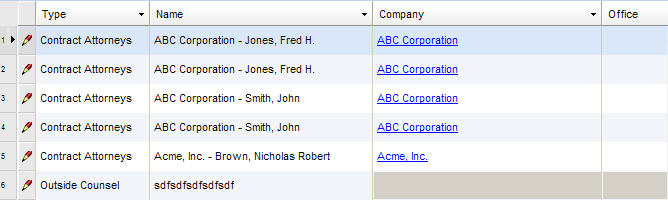
Below provides a description of the fields contained in the main (header) section of the Vendors notebook. Note that, because this screen scrolls horizontally, the screen excerpts and field definitions have been presented in segments. To add a record, see Adding a Vendor Record.
LawManager Web
|
Field |
Description |
Required (Y/N) |
|
Type |
A description of the vendor type. |
Y |
|
Name |
The vendor's full name. |
Y |
|
Company |
The company name associated with the vendor. If the vendor is a company, this field is input by the user when a record is added/updated. If the vendor is a person, this field is disabled during data entry but may auto-populate with the vendor/person's company name when the record is saved. |
Y |
|
Office |
The location of the vendor's office. |
N |
|
Tax ID |
The vendor's Tax ID. If the company is in a foreign country, the company's foreign ID. |
N |
|
Code |
The vendor's ID code, if applicable. |
N |
|
Class. |
The vendor's classification (clerk, paralegal, etc.) |
|
|
Cost Rate |
The hourly rate for the vendor. Note that this field only displays when personnel has been selected in the Type field. |
N |
|
Prefix |
A prefix associated with the (e.g., Ms., Dr., Mr., etc.). This field is only displayed if the vendor is a person, not a company. |
N |
|
First Name |
The vendor's first name if the vendor is a person. This field is only displayed if the vendor is a person, not a company. |
N |
|
Middle Name |
The vendor's middle name or initial if the vendor is a person. This field is only displayed if the vendor is a person, not a company. |
N |
|
Last Name |
The vendor's last name if the vendor is a person. This field is only displayed if the vendor is a person, not a company. |
N |
|
Suffix |
The vendor's suffix or salutation (e.g., Dr., Ms., Mr., etc.). This field is only displayed if the vendor is a person, not a company. |
N |
|
Title |
The vendor's title (e.g., clerk, associate, etc.). |
N |
|
P/ C |
Information indicating if the vendor is a person or company. |
Y |
|
Status |
Information indicating if the vendor's status is active or inactive. |
Y |
Note: All vendor records include fields containing audit and security information. For a detailed explanation of these fields, see Viewing Audit Fields and Security Information.